
3. (出示打印的电子邮件桌面图片,有网络的学校可以用联机的电脑直接演示。)
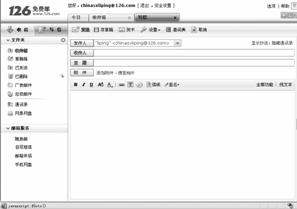
T: Boys and girls, look at this table. I’ll show you how to send an e-mail.
(教师边用图片或网络操作,边用英文慢速讲解两遍,让学生借助图标上的中文,感受发送电子邮件的步骤。)
T: Of course, we should turn on our computers and connect to the Internet. Then open the e-mail program. OK, let’s know the buttons. First, this button写信 means writing a letter. Click here, another box will appear and then click on 收件人 . It means the receiver’s e-mail address. The third step is to click on 主题, which means subject. Type the title of your e-mail. The fourth step is to write your e-mail in this big and empty box on your screen. The last step is to click on 发送 , which means sending. Now, do you understand? Can anybody send an e-mail now? Once again … OK? S11, please! Think it over and try it, please.
S11: OK, let me have a try.
(让学生演示一遍,确保学生都明白发邮件的具体步骤。教师板书生词,释义,领读并要求掌握。)
|
turn
on connect to Turn on your computer and connect to the Internet. click on Click here, another box will appear and then click on… screen |
2. (师生互动,激发学生兴趣,导出新课。)
T: Boys and girls, we talked something about computers just now. Do you like playing computers in your spare time?
Ss: Of course.
T: What do you usually do online? Can you tell me?
S6: Play computer games.
S7: Search for some information or read news.
S8: Make friends.
T: Good. Computers are playing an important role in our daily life. We all know that computers help people do a lot of things in many areas. For example, you can communicate with your friends by sending e-mails. Do you know how to send and receive e-mails by computer?
S9: No.
S10: Yes.
T: OK, let’s see how to send and receive e-mails.
Step 1 Review 第一步 复习(时间:14分钟)
1. T: Boys and girls, we have learned something about computers last period. Please say something about the computers’ uses.
S1: Computers have become very important in many areas of work and leisure.
S2: Computers are widely used by people in business and technology.
S3: Computers control the speed and direction of a spaceship’s flight in space.
T: Very good. Any more?
S4: With the help of computers, doctors can find diseases easily and solve other problems.
S5: People’s lives at home have changed since the Internet came into being. They can shop and
do business at home. People communicate by sending e-mails and chatting on line. The world is getting smaller, like a “village ”.
T: Nice work.
打印的电子邮件桌面图片/中英文按钮卡/教学录音带/录音机
4. Learn how to send and receive an e-mail.
3. Review expressions about spaceships and computers.
2. Summarize the grammar: Verb+object+complement
1. Learn some new words and useful expressions:
turn on, connect to, screen, click on
2. Homework:
Retell the passage in 1a.
板书设计:
|
Spaceships are mainly controlled by
computers. Section C They keep their hearts beating normally. no doubt Computers have made workplace safer and better. for instance Computers have made the world smaller. There is no doubt that… |
Section D
The main activities are 1a and 3. 本课重点活动是1a和3。
1. (分组讨论如何给网吧写一个上网注意事项,提醒常去网吧的人注意上网卫生,养成健康的上网习惯。)
(教师用投影仪展示格式,给予提示。)
 Welcome to … Net Bar. Welcome to … Net Bar. Tips: (1) Have a rest every two hours when you are on the net. (2) (3) (4) |
T: Boys and girls, work in groups and try to write some tips for the persons who like to spend time in the net bar.
湖北省互联网违法和不良信息举报平台 | 网上有害信息举报专区 | 电信诈骗举报专区 | 涉历史虚无主义有害信息举报专区 | 涉企侵权举报专区
违法和不良信息举报电话:027-86699610 举报邮箱:58377363@163.com